Originally published on the GRID blog.
How rigorous testing and real-world benchmarking help us match Excel and Google Sheets while delivering lightning-fast calculations.
GRID is a spreadsheet technology company. Our spreadsheet engine powers website calculator builder Calculator Studio and the LLM + spreadsheet showcase seen at spreadsheetpowered.ai.
This post is about our approach to testing the engine. For deeper technical context, see our popular post from a couple of years ago: We built a spreadsheet engine from scratch. Here’s what we learned.
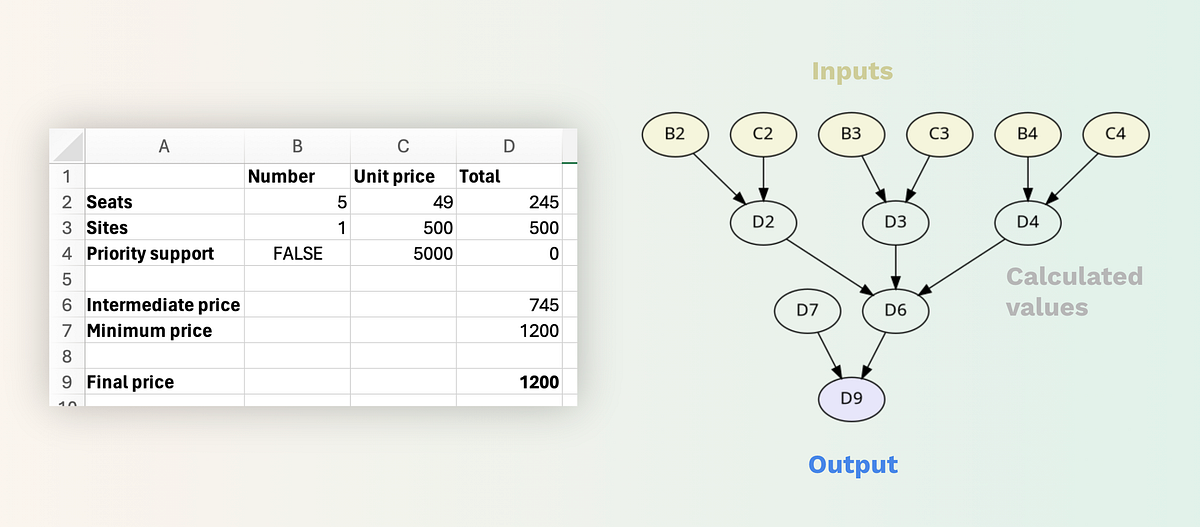 At the heart of a spreadsheet engine is a dependency graph
Compatibility and Performance
In developing our engine, we have prioritized both compatibility with Excel and Google Sheets, and the performance of calculations.
- Compatibility is critical because users need to trust that running their models in our engine will yield the same results as their native spreadsheet software.
- Performance is equally important, especially for interactive use-cases such as tying a slider to an input value to visualize real-time updates in charts and other calculated outputs (e.g. in Calculator Studio). Our target is to recalculate models at “animation speed,” and for all but the most complex models we consistently achieve this.
To meet our compatibility and performance goals, every change to the engine undergoes rigorous testing.
Firstly, every build runs almost 200,000 automated unit tests. These ensure there has been no drift in the way the engine handles already implemented syntax, calculations and functions, including a wide range of inputs and corner cases.
Benchmarking the Real World
More uniquely, every change to the engine is run against a large and continually growing set of real-world workbooks. This allows us to test for spreadsheet patterns and usage that we haven’t written tests for specifically, but comes up “in the wild”.
The scope of these tests varies from a few thousand to tens of thousands of workbooks per run. Each workbook is loaded, recalculated, and the results from our engine are compared to the values previously saved in the workbook (i.e., the latest results from Excel or Google Sheets). Any discrepancies are logged. Since Excel and Google Sheets behave differently, the engine operates in separate compatibility modes depending on the workbook’s origin.
These tests also ensure that for any change to a value in a cell, all dependent cells — that is cells with formulas that refer to the changed cell — are re-calculated, monitoring for any flaws in the recalculation algorithm itself.
We also track and log the time it takes to load, initialize, and recalculate each model.
Ensuring Stability AND Broadening Coverage
The test results are compared to previous test runs. Any drift in performance or accuracy triggers a review of the changes being made.
The logs from these tests also help discover any new discrepancies or undocumented patterns in spreadsheet usage in recently added workbooks. We maintain a list of these issues, ordered by the number of workbooks and customers potentially affected, which serves as a roadmap for further improving compatibility.
This level of testing gives us a high level of confidence in every build and keep us on a track of continuous improvement in both accuracy and performance, while also broadening our testing coverage with pretty much every workbook we encounter in our systems.
— — —
Written by Hjalmar Gislason, founder and CEO of GRID — the creators of Calculator Studio. Have an opinion about this? Tell me what you think on Twitter or LinkedIn.