Originally published on the GRID blog.
From the very beginning, one of the core ideas behind GRID has been that spreadsheets — and spreadsheet models in particular — can be made easier to share and consume by bringing them to the web with beautiful narration and engaging interactivity.
For the interactivity we knew that we’d need a lightning-fast spreadsheet engine, compatible with Excel and Google Sheets and capable of running entirely in the browser. As no such engine (of any significant sophistication) was available to us, we also knew we’d have to write it ourselves.
By now, we’ve built what’s arguably one of the 4–5 most sophisticated spreadsheet engines on the planet, and — possibly after Google Sheets — the most advanced one that can run entirely in the browser.
This hasn’t been a trivial task. Here are some of the things we’ve learned along the way.
The basics - it all depends
I don’t get tired of explaining that a spreadsheet model is a program. The key difference between building a spreadsheet model and what most people think of as programming is that instead of coding instructions that are executed sequentially, a spreadsheet modeler declares a relationship between data elements that live in cells in a two-dimensional grid.
To determine the order in which to do these calculations and identify which cells need to be recalculated if a value is changed, a spreadsheet engine must maintain a dependency graph. This is a directional graph with a node for every cell with a formula and links to the cells they depend on (refer to).
Such a dependency graph is at the heart of any spreadsheet engine.
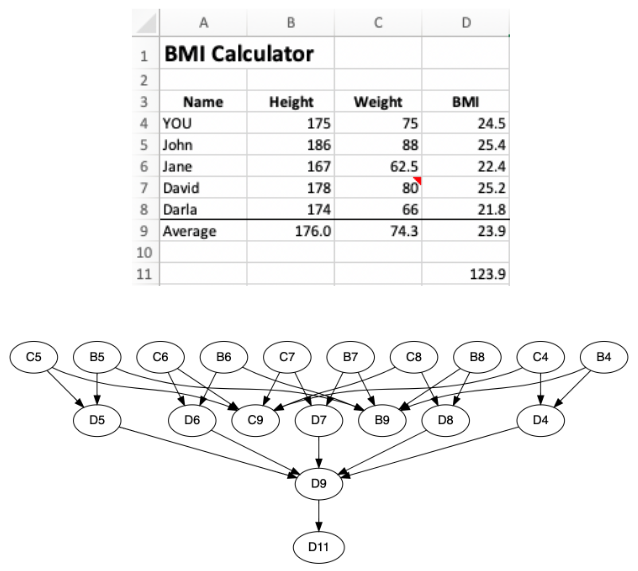 D11 is simply =D9+100 for illustrative — not practical — purposes
The image above shows the dependency graph for a simple spreadsheet. These can get very complicated very fast, and even a modest spreadsheet model can easily be dozens of layers deep with thousands of relationships between cells. For larger models, the need for various optimization techniques arises quickly, some of which we’ll touch upon below.
Parsing, functions and operators
In order to build the dependency graph and be able to calculate a cell’s value, each cell with a formula needs to be parsed. For this, we need a parser.
A formula can consist of a combination of any of the following:
- Constants: Such as a numerical value (
100) or a string (“Quantity”) - References: Such as
A1orB2:D10 - Operators: Such as
+,-,*,/, or& - Functions: Such as
SUM,IForBAHTTEXT
These must follow a set of rules in the order and way they appear. These rules determine the syntax of the formula language. Interestingly enough, while it is arguably the most used programming language in the world, this language doesn’t formally have a name, but — as explained in another post — it should rightfully be called Excel formula language.
The parser reads formulas written in this language, enforces the syntax and — if valid — turns the formula into instructions for how to calculate a given cell’s value.
The constants and references are fairly straight forward, but the operators and functions signify operations that are to be performed on constants or calculated values. Strange as it may seem (at least to those in the audience that aren’t computer scientists) operators and functions are more or less the same thing, i.e. they are technically just different ways the syntax provides to signify operations to be performed. Google Sheets in fact has functions that correspond to almost every operator such as ADD for + and MULTIPLY for *.
There are about 20 operators, but the number of available spreadsheet functions is quite staggering. At the time of writing, Excel has 510 functions, Google Sheets has 494 functions, and they have 445 functions in common. The latest version of the “Open Document Format for Office Applications” (OpenDocument) standard has 391 functions, most — but not all — of which are among those common between Excel and GSheets.
Taken together the two engines and the standard have 574 unique spreadsheet functions and 22 operators. To further complicate things some of the functions are slightly different in their expected syntax and in the way they are implemented between Excel and Google Sheets. FILTER and SORT are two examples:
=FILTER(array, include, [if_empty])(Excel)=FILTER(range, condition1, [condition2, …])(GSheets)=SORT(array, [sort_index], [sort_order], [by_col])(Excel)=SORT(range, sort_column, is_ascending, [sort_column2, is_ascending2, …])(GSheets)
So in reality there are more than 600 unique spreadsheet operations in this scope.
Not all these functions see the same amount of use, however. As you would imagine, there’s a long tail distribution here. SUM, IF, NOW and AVERAGE top the list while many other functions are very rarely used. In fact, when I started investigating GRID as an opportunity about 4 years ago I ran analysis on a few spreadsheet corpuses. In about 40,000 spreadsheets only 109 of these functions were ever used! We used this information to prioritize the functions we initially implemented.
Now that GRID is quite mature and we’re “ingesting” thousands of spreadsheets per day, we have a much bigger set to analyze that is more representative of current, everyday business use than those corpuses. Our engine currently supports 398 spreadsheet functions and those cover well over 99% of all the spreadsheets we see (on average we encounter ~2 spreadsheets with an unsupported function per day). The most commonly encountered unsupported functions nowadays are the Google Sheets specific IMPORTRANGE and GOOGLEFINANCE functions, both of which create connections to external data which we are unlikely to implement in GRID in the same way. In short, we’re already far down the long tail, but still continue to add support for new functions, the latest addition being a set of 14 functions newly made available in Excel. For those we had full support in GRID before they were even out of beta from Microsoft:
A few words about implementation
Before moving beyond those basics, a few words about how our spreadsheet engine is implemented.
The bulk of it is written in pure JavaScript. Lately we’ve been writing parts in Rust, compiling into WebAssembly. As performance is so important, this feels like an ideal project for WebAssembly, but the fact of the matter is that JavaScript — which gets compiled to machine code on the fly — is also lightning fast so the performance advantage we have seen with WebAssembly have not been significant.
Browser support for WebAssembly is good, and only old browsers (already outside our browser support policy) and Microsoft’s Edge configured with very strict security settings have given us issues. What has been more problematic is the lack of support in some of the software in our development stack, such as test and build tools. For these reasons we still maintain a fallback JavaScript implementation for the WebAssembly code.
While in other parts of our product (our editor, documents and overall web application) we utilize a lot of fantastic 3rd party libraries, the story is different for the spreadsheet engine. The key reason for this is how imperative compatibility with the leading spreadsheet engines is to us.
To be clear, open source implementations of spreadsheet engines exist, such as Formula.JS, POI and OpenOffice. We have sometimes looked at these but we’ve mostly decided that they fall short of our quality standards, or are incomplete (as in: we don’t need a reference for SUM, we need it for harder functions that these engines don’t have). They are also at times simply “wrong”, at least in the sense that they return results different from Excel and Google Sheets.
So currently, external libraries in the engine are only used for number formatting and statistical routines to draw from probability distributions, used in statistical functions like NORM.DIST.
That said, we do use external libraries for linting and testing the engine in a large suite of automated and scheduled tests that ensure the quality and compatibility as we continue to expand and evolve the engine. A little more on that below.
Advanced features and finer details
In the “Basics” chapter above we covered the key aspects of a spreadsheet engine. But that means leaving out a lot of the dirtier details, exceptions and advanced features that muddy the waters.
Here are but a few of these topics:
- Volatile functions: Upon a change in a spreadsheet, typically only those cells that depend on the changed cell need to be recalculated. However, cells that have functions such as
NOWandRAND— called volatile functions — are recalculated every time anything changes in the spreadsheet, and thereby any cells that depend on them as well.
Every time B1 is recalculated, every RAND() function in B3:E6 is recalculated
- Dynamic references: Generally speaking, the dependency graph for a given spreadsheet doesn’t change unless its formulas are changed. However, certain functions, such as
OFFSETandINDIRECTallow the creation of references that dynamically change with changes to values in the spreadsheet. This is an immensely powerful feature for modeling, but as you can imagine it complicates things significantly when it comes to recalculations.
The chosen scenario in B3:B6 is an OFFSET result from C10:E13
- Spilling: While most spreadsheet functions return single values, some can return arrays. Until recently, this was merely an internal consideration in calculations, but in 2018 Excel introduced dynamic array functions that can result in so-called “spilling”. This means that returned arrays will flow (spill) into adjacent cells. Those “spilled” cells will then hold values that result from calculations in a different cell, yet have no formula themselves. Other considerations include that there may already be content in the cells the results are spilling into, in which case the formula must result in an error rather than overwrite their contents. And just to make things interesting Google Sheets has a similar functionality that still behaves in a significantly different way (Sheets had this first, but Excel did it better if you ask us).
The formula in cell B8 is =FILTER(B1:C4,C1:C4>B6,”No result”) — B9:B11 and C:8:C10 are blank
- Iterative calculations: Sometimes a spreadsheet model will have a circular reference, i.e. a cell will depend on a cell that in turn (sometimes through a long chain of references) will depend back on the same cell. While circular references usually happen by mistake and will — by default — throw a warning as soon as they are created, there are instances where they are necessary to calculate the values of variables that are truly dependent on each other. This means the dependency graph mentioned in the basics is no longer a unidirectional (acyclic) graph, but can be a cyclical one. This also means that the calculations need to be done over and over until the interdependent values converge on a solution (or time out if they do not converge in such a way). These iterative calculations are complicated, but essential in various complicated and high-value models for example in finance and engineering.
Cell C4 refers to cell C3 which in turn refers to C4 = circular reference
GRID supports all of these advanced features. Other interesting topics (largely supported too), that we’ll leave out of the discussion for now include:
- Named ranges
- Relative references
- Intersections and unions
- Passing cell formatting along with calculation results
Optimizations
It’s not only advanced features that divert the spreadsheet implementation away from the basics. As speed is of utmost importance, optimizations are important. And this is not only about making each calculation as fast as possible. In fact, many of the optimization opportunities are rather on the dependency graph level, where clever avoidance of unnecessary work can dramatically improve performance. Here are two (of many) examples:
- Conditional branches: While conditional functions — such as
IF— technically depend on every cell they refer to, only branches whose criteria are met, need to be evaluated. Hypothetical example: For=IF(2+2=5, SUM(A1:A500), SUM(B1:B500))only the FALSE branch ,SUM(B1:B500), needs to be calculated, thereby allowing us to safely skip the hundreds of additions ofSUM(A1:A500)in the TRUE branch. - Large ranges: Ranges that hold tens or even hundreds of thousands of cells, will quickly bloat memory usage and hurt performance if every cell is represented individually in the dependency graph. Say you have a lookup function like
=VLOOKUP("Mickey Mouse", A2:D10000, 4)(it looks for a row matching the string “Mickey Mouse” in column A, and returns the value from column D in that same row). We don’t want this reference to be represented as ~40,000 individual dependencies, but rather treated as one, which is what our engine does. It then uses a so-called R-Tree to efficiently find all range references that cover a particular cell.
Compatibility
As we’ve hinted at above, it’s crucially important for GRID that users’ models return the same results when running in GRID as when they run them in their Excel or Google Sheets. Seeing different results in GRID will quickly ruin their trust in our product. Hard to debate, so just make sure the calculations are correct — right?
Well, here are but a few of the things that require consideration:
- What’s “correct” anyways: Some calculations may have multiple solutions. Financial functions like
IRRandXIRRare examples of this. For these it is not enough to return a solution, it must be the same solution as the spreadsheet software returns, so understanding which method the other spreadsheet engines use for these calculations is important. There is also a plethora of edge-cases to consider:- What should a lookup function return if it relies on values in a column being ordered, but they are not?- How to treat international characters when sorting alphabetically?- When doesFALSE=0orTRUE=1? Fun fact: In spreadsheet comparison bothTRUEandFALSEare larger than1(in fact they are larger than any number), yetFALSE * 1=0andTRUE * 1=1!This list goes on. - Quirks: There are a lot of unexpected quirks, eccentricities and even plain bugs in existing spreadsheet engines that users have come to know and even rely on. Naming just a few here:- Whether functions return a
#VALUE!or#N/A!error sometimes seems to depend on which programmer first implemented the function at Microsoft or even Lotus Software back in the day. But it can make a difference if the model is built to expect one but not the other (e.g.=IFNA(C3,C4)).- What happens when a modeler leaves out parameters in a function call (e.g.=FV(1,2,,4)) is usually undocumented, but relied upon by many seasoned modelers.- TheDATEDIFfunction returns blatantly wrong results under certain scenarios. This is a known “bug” that is maintained by Microsoft “in order to support older workbooks from Lotus 1–2–3”, software that all but went away over 25 years ago! - Precision: Precision in floating point calculations (calculations that involve fractional numbers) are a famously tricky subject in computer science. Normally, programmers don’t have to think too much about this, but when implementing a calculation engine, one does not have that luxury. Excel calculates with 15 significant digits. This is rarely a problem for integer calculations (however, type a number in the hundreds of quadrillions into your spreadsheet, format them as a plain number and you’ll start to see trailing zeros). But — without caution — this can cause issues even for the simplest of calculations with fractional numbers. Making sure that
=0.1 + 0.2is equal to0.3and not only precisely0.30000000000000004is not perfectly straight forward, and in order to do so, spreadsheet engines go through a significant amount of trouble, even at the level of individual functions. - Google Sheets vs. Excel: Given all the quirks and nuances explained above, it will probably not come as a surprise that there are some discrepancies between results of the same calculations between Excel and Google Sheets. This, despite Google Sheets’ careful emulation of Excel’s core functionality in their early days. Since then, they’ve diverged a bit and in some cases Excel is now chasing Google Sheets, but Microsoft clearly cares less about interoperability (their implementation of dynamic array functions like
FILTERandSORTmentioned earlier in the post being blatant examples). For our implementation, we look to Excel first. If there is a difference in the results from the two engines, we’ll “do what Excel does” (a phrase that gets thrown around the office a bit). If we can accommodate both without a logical downside, we’ll do so. This usually comes down to things like whether to accept arrays vs. single values or booleans vs. integers in function calls.
To ensure our quality and compatibility in line with the above, our Engine team runs tens of thousands of manually built (but obviously automated!) tests upon every build of the engine. Furthermore, we regularly run a test against a large sample of spreadsheets that GRID users have connected to their documents, looking for discrepancies. This way we can monitor the differences and how common, serious and significant they are. There are still some, for sure, but this way we can rest assured that there are no commonly encountered discrepancies that have a serious negative effect on our quality, and a prioritized list of improvements to make.
What’s next?
Our spreadsheet engine is well past the infancy stage, and while we’ll keep improving on performance, implement some of the remaining functions and eliminate discrepancies from the traditional spreadsheet engines, we’ve reached a stage where the most interesting development goes beyond what existing engines are capable of. Three areas we’re currently working on or laying the groundwork for are:
- Group and aggregate: Building into our engine capabilities to transform row-level data (think survey results, transaction records, product orders, …) to facilitate insight. Traditional spreadsheets tackle this use-case mainly through pivot tables, but with GRID’s separation of presentation from the data and logic in the spreadsheet, we see opportunities to build this into the spreadsheet itself in a more consistent way while at the same time providing a user experience that beats the somewhat involved process of putting together pivot tables (something that only a small proportion of spreadsheet users know how to do).
- Compatibility mode: Above, we’ve mentioned various differences between Excel and Google Sheets, ranging from different implementations of the same functions (or using the same names for different functions), to differences in calculation results, to not supporting the same set of operators. Our Excel-first approach has served us well, but the Google Sheets audience is also important to us, and currently we don’t offer them quite the same level of compatibility as Excel users. We plan to solve this by making our engine aware of which software a model originated in and simply doing “the right thing” for each.
- Our own functions: We already have a set of functions in our engine that are specific to GRID, yet none have been exposed externally. And we plan to implement more; many opportunities on that front have to do with the unique nature of GRID’s engine running as a part of a web document. For example being able to build documents that take into account whether a viewer is using a desktop or a mobile device or which credentials the viewer has opens up a range of possibilities. Our — currently experimental — canvas element (see it in action here) will also come with a set of unique functions that will allow spreadsheet users to dynamically draw and make graphical representations they’ve up until now never even dreamt of.
Further reading
- Spreadsheet Implementation Technology
 by Peter Sestoft is by far the best resource we’ve come across on the implementation and optimization of spreadsheets.
—
Written by Hjalmar Gislason, founder and CEO of GRID with input from our Engine team: Borgar, Gulli, Eirikur, Matt and Arni Dagur. Our copy-writer — Melanie — made it a pleasure to read. Special thanks to our scientific advisor and “father of the spreadsheet”, VisiCalc creator Dan Bricklin for historic context.