Originally published on the GRID blog.
ChatGPT is not ready for spreadsheet models. It will give you wrong results … and do so with confidence.
Earlier this month we at GRID began showcasing new capabilities that integrate our spreadsheet engine with leading LLM models to deliver reliable, verifiable calculations based on the language of business — spreadsheet models.
What follows is a side-by-side comparison of our spreadsheet powered AI solution and the one leading LLM provider that accepts spreadsheet files at all — ChatGPT.
We provided the same simple spreadsheet model to both solutions and asked them the same exact questions.
Spoiler alert: The differences will seem subtle at first, but as things progress you’ll see that in its current state ChatGPT is totally incapable of working with spreadsheet models and would serve its users better by refusing to engage whenever formulas are present in spreadsheets.

1. Upload and first analysis
Each session begins by simply uploading an Excel file:
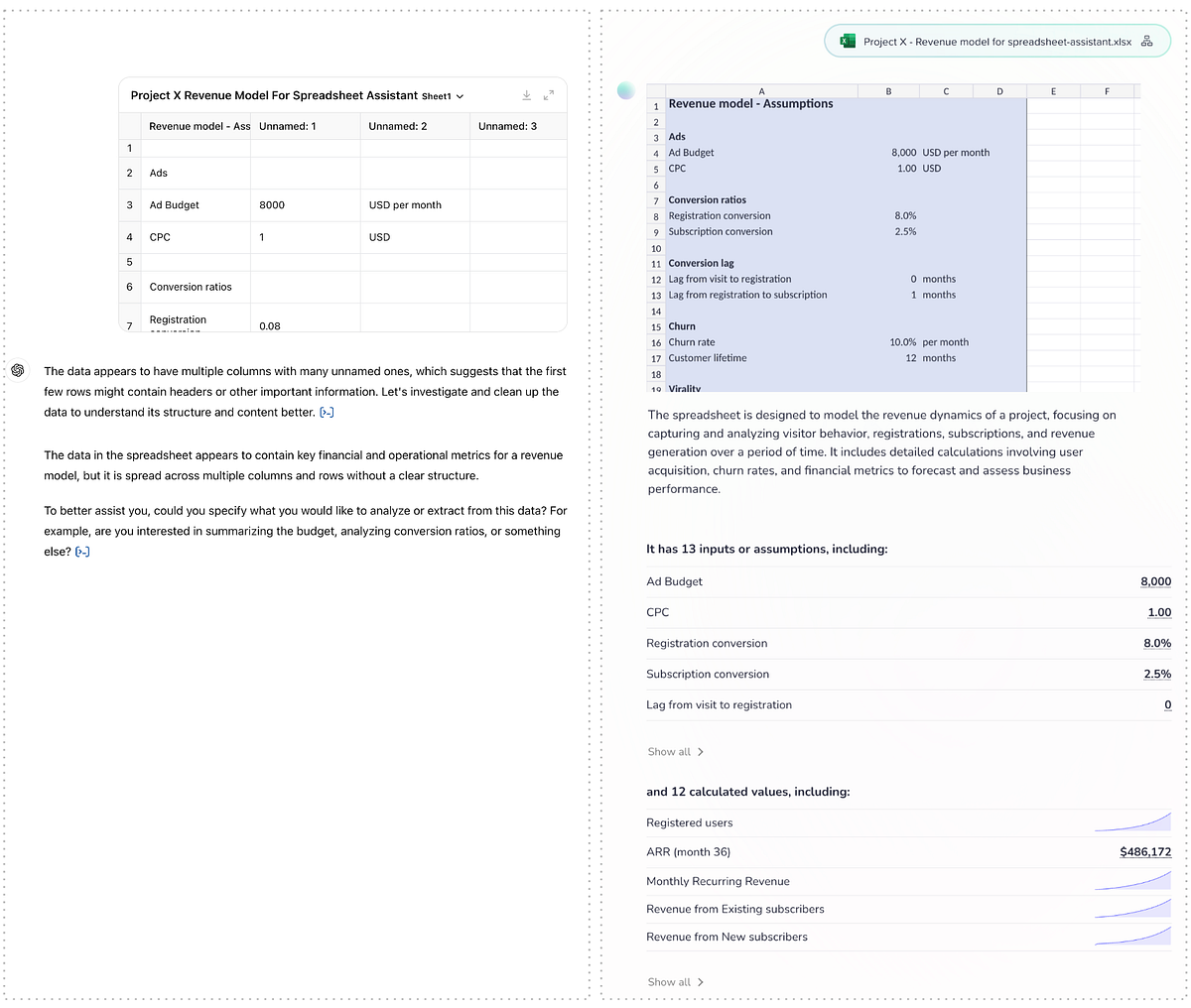
ChatGPT assumes that every spreadsheet file holds tabular data and loads it behind the scenes into a tabular structure in Python (Pandas).
This tabular assumption is evident in both ChatGPT’s preview of the file and the text description that follows. By contrast, our spreadsheet powered AI shows a formatted preview of the spreadsheet, a text description focused on the contents and purpose of the file (rather than its structure) and lists the inputs/assumptions and calculated values and series that are likely to be of interest based on analysis of the dependencies in the model’s formulas.
2. Basic charts
Next, we ask for a chart showing key data from the spreadsheet:
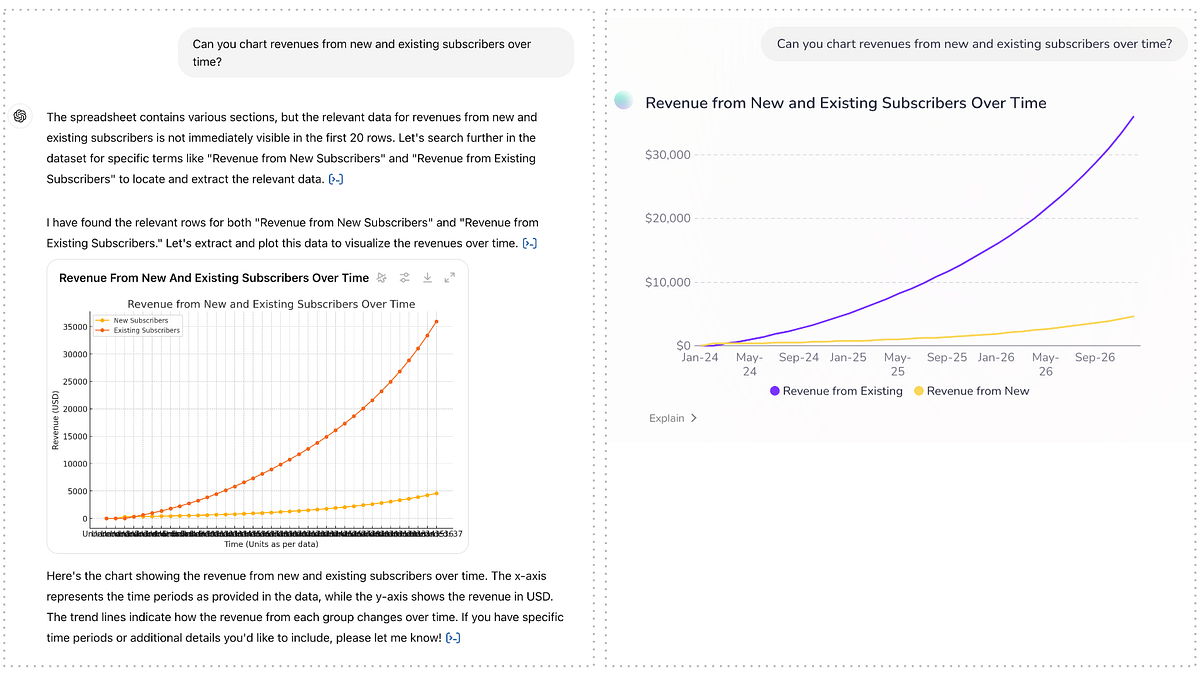
As these series are present in their respective rows in the file, the tabular structure doesn’t get in ChatGPT’s way here and it identifies the correct series. The quality of the charts is a matter of opinion, but calling out the collapsing X-axis labels in ChatGPT’s chart as a shortcoming feels fair.
3. Refining charts
Next: Iterating on the chart:

Both solutions do well here. The comparison comes down to aesthetics and X-axis labels again.
4. Asking about assumptions
Now let’s ask for some of the assumptions in the model:
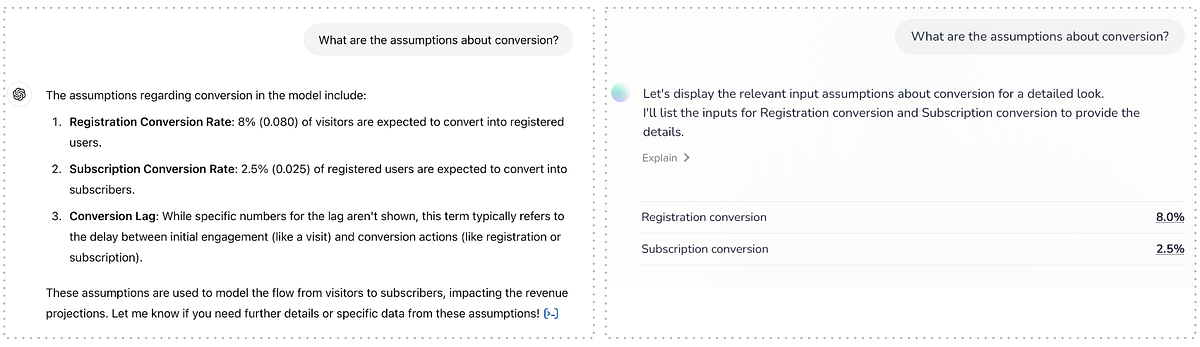
Again, as the labels for these assumptions are in the first column of the spreadsheet, the assumption of a tabular structure doesn’t get in ChatGPT’s way and it finds the relevant data. Whether or not to list the conversion lag when asking about assumptions about conversion is a matter of opinion and certainly not wrong.
5. And now to the calculations
So far, we’ve only been asking for static values that were already stored in the spreadsheet when it was saved. It’s when we start changing assumptions that call for a recalculation of the model that things become interesting.

Having loaded the model into a true spreadsheet engine, our spreadsheet powered AI has no problem updating the relevant cell and running recalculations according to the formulas in the model. It also knows that the ARR is an output of the model (a final result of all the calculations) and chooses to highlight the effect of the change we made on that value, where ChatGPT has to be asked for it specifically.
More importantly though ChatGPT’s results are wrong. Off by a factor of ~3x, yet stated confidently and without reservation. On the surface of it, you wouldn’t know which solution’s answer to trust. Luckily both offer explanations of how they came to the conclusion. Let’s compare:

As it only read the static data, ChatGPT has no knowledge of the formulas in the spreadsheet file. However, rather than gracefully bowing out it uses its Python representation of the data to conjure up some calculations and returns their (wrong) results.
Meanwhile, our solution plainly explains which values were changed in which cells, and even shows the cells highlighted in context upon hovering over those values.
Also: The proportion of spreadsheet modelers that will know and appreciate Python code is likely low, whereas — as it is built for spreadsheet usage specifically — our solution literally speaks their language.
6. Finally: Using the model “in reverse”
The final interactions in this comparison is asking for help to a fairly straight forward business question: What do I need to change to reach my goal:
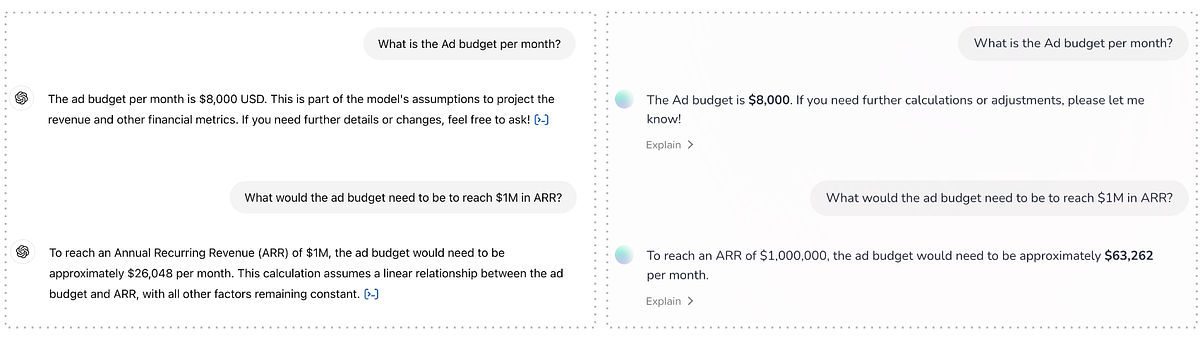
Both solutions correctly identify the monthly ad budget, which is set at $8,000 in the saved spreadsheet. But when asked to adjust the budget, so that — per the modeling in the spreadsheet — the goal of $1M in ARR would be reached, ChatGPT again comes up with its own calculations and as a result, its own wrong results. Our spreadsheet powered AI however, uses a spreadsheet feature called goal seek to adjust the value in the cell representing the ad budget until the goal of $1,000,000 in ARR is reached and returns the resuls.
ChatGPT is again off by a factor of roughly ~3x, but more damaging is the assertiveness with which it responds to the question. Digging into the code it came up with, it again becomes clear that its simply making up calculation methods rather than using — or even taking hints from — the modeling in the spreadsheet it was given.

Conclusion
I appreciate that many spreadsheets hold tabular data with no formulas — the kind of data that could as well be saved in a CSV file. And for this kind of data, ChatGPT can be useful. Using the Python/Pandas integration it can do aggregations and draw charts such as sales by month from a transaction list or number of students that pass a certain grade on an exam.
But for spreadsheet models that hold formulas and logic, ChatGPT should simply bow out and at least refuse to answer questions that require calculations. Such questions can only be answered by integrating with a proper spreadsheet engine that can run the model as intended and reliably return both correct, and verifiable responses.
—
If you are interested in learning more about spreadsheet powered AI, go ahead and sign up for a demo and be among the first to experience it hands-on.