Originally published on the GRID blog.
The Rise of a New UI Paradigm
Look at the recent capabilities of leading LLM environments and squint — and you can see a future where the focus shifts from the applications we use to the tasks we want to accomplish.
In this future, we won’t be “opening PowerPoint,” “going to Asana,” or even “Googling” something. Rather we’ll want to “present our idea”, “note a task,” or “find out” information. The LLMs will draft the appropriate actions and artifacts, conjure an appropriate user interface to iterate on them and communicate with the systems needed to get them done.
I maintain that the LLM environments are in a position to become the interface to all our digital tasks. This would represent a radical user interface shift — perhaps the most significant since the advent of the graphical user interface.
It might seem like a bold claim, but let’s explore why it’s not as far-fetched as it sounds.
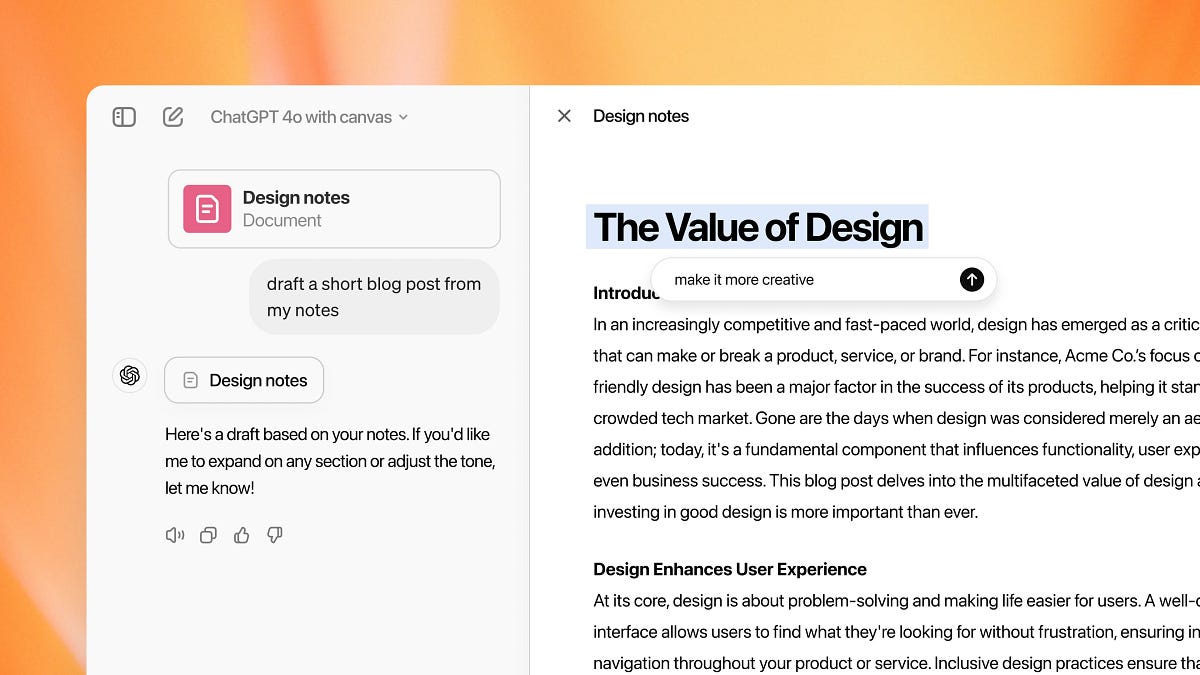 ChatGPT’s Canvas hints at the future
The Ingredients of This Future
To follow this line of thinking, we need to consider the components already present in modern LLM environments — such as ChatGPT and Claude — that are still in their early stages:
- In-Place Iterations: Features like Claude’s Artifacts or ChatGPT’s Canvas, where we refine content without starting over. The artifact takes center stage and the conversation becomes secondary.
- Function Calls: The ability for an LLM to interact with other systems via API, enabling it to fetch information or execute tasks in another system. See e.g. GPT Actions.
- Web Search and RAG: The ability to search the web or retrieve information directly from specific sources on a particular domain to then summarize the retrieved content, providing references and links. See ChatGPT Search and a definition of RAG.
- Personal data access: Access to our emails, files, contacts and calendar, such as best demonstrated in recent Apple Intelligence demos.
- Computer Use: LLMs that can control applications on our client devices, such as the recent computer use release by Claude.
These ingredients position LLMs as the “command line for everything,” but not in the way we once knew command lines. Instead of rigid commands and strict syntax, LLMs interpret our vague human-language instructions, guiding us to effective ways to accomplish our tasks.
This “command line” metaphor is just a starting point. Traditional command lines evolved into graphical user interfaces. In the LLM world, language may be a great starting point and aide on the side, but for in-depth work on artifacts, point-and-click elements in rich UIs are more practical.
Such interfaces will increasingly emerge in LLM interfaces. The — still limited — ability to “suggest edits” in ChatGPT’s Canvas directly, hints at how we will collaborate on iterations with the LLM, sometimes editing directly, sometimes conversing with the LLM about them. The way developers already interact with LLMs in their IDEs provide a more mature example of the two-way collaboration with LLMs that will make their way to other artifacts.
 Richer interfaces have started emerging inside the LLM environments
How This Could Look in Practice
Let’s consider a few common tasks in this task centric world:
- Write an email introducing a colleague: The LLM pulls profile information from LinkedIn via function calls. It accesses my email history to find contact details and any relevant context. It drafts the email in my usual style, introduces each party, includes relevant LinkedIn links, and suggests next steps — all within an in-place “artifact interface” that looks like a familiar “New Email” window. I can make quick edits or iterations, drag in attachments if needed, and then send.
- Create a presentation from yesterday’s brainstorm: The LLM accesses meeting transcripts to summarize key points. I iterate on the summary to create a compelling story arc. Once I’m satisfied, I ask for a slide deck. A “presentation mode” opens in the “artifact interface”, with each slide drafted and formatted. I add a theme, request specific imagery, and tweak some slides by hand. No need to launch presentation software or start from scratch.
- Add a new team task: I provide a brief description, and the LLM, aware of previous context from meetings or recent activities, adds the details. When ready, I ask the LLM to add it to a task management system like Asana or Jira, using function calls to assign it, add tags, and set due dates.
Imagine extending this thought experiment to collaborative work — multiple people interacting with the same document, artifact, or interface simultaneously, much like today’s online collaboration tools.
And we haven’t even started talking about tasks that the computer will work on while we are away. Agents that we’ve asked to deal with certain inbound messages, monitor a travel deal or look out for news about competitor activities — to name but a few.
In this envisioned world, foundational LLM environments like ChatGPT and Claude become our operating systems, our browsers, our productivity tools, and the interface to countless SaaS applications.
 A neat demo, or the future of computer use in its infancy?
The LLM Race is Also a Race for the Best UI
While Microsoft, Google, and many SaaS and traditional software vendors build “copilots” within existing software frameworks, new paradigms — like Claude’s Artifacts and ChatGPT’s Canvas — hint at a more flexible, iterative workspace where we seamlessly navigate between drafting documents, presentations, data analysis, and everything else. It’s a workspace where the boundaries between different types of tasks and tools blur.
This transformation isn’t just about building the most powerful language model. It’s also about delivering the most intuitive, integrated interface — one that fundamentally reshapes how we interact with the digital world.